密钥的填充与分析

1 、实验概述与内容 Overview
熟悉密钥加密中的概念。以及一些常见的加密攻击。
从这个实验中,涉及关于加密算法、加密模式、填充和初始向量(IV)。
此外,能够使用工具和编写程序来加密/解密消息开发人员在使用加密算法和模式时犯了许多常见的错误。这些错误削弱了加密的强度,并最终导致漏洞。
这个实验室使学生暴露在其中的一些错误中,并要求学生发起攻击以利用这些漏洞。
本文涵盖以下主题:
- 密钥加密。
- 替换密码和频率分析。
- 加密模式、IV和填充。
- 使用加密算法时的常见错误。
- 使用加密库进行编程
1 、 频率分析
- 第一步:使用命令tr中的-d参数和-cd参数来转化所给的文本,所以第一步是保留字母、空格和换行符作为明文。
$tr [:upper:] [:lower:] < ciphertext.txt > lowercase.txt
$tr -cd '[a-z][\n][:space:]' < lowercase.txt > plaintext.txt
- 第二步:使用python程序来生成a-z的随机排列。
>>> import random
>>> s = "abcdefghijklmnopqrstuvwxyz"
>>> ''.join(random.sample(s,len(s)))
'azfgmunhrqwetlxicdksjbpvyo'
- 第三步:加密步骤
$tr "abcdefghijklmnopqrstuvwxyz" "azfgmunhrqwetlxicdksjbpvyo" < plaintext.txt > ciphertext.txt
英语字母分析
使用单字母频率分析后,排列如下:
msaxhdlrgkefpnubjiztywcqvo
比较百度百科所给现代英语所使用的频率来进行转换和替换:
$ tr 'msaxhdlrgkefpnubjiztywcqvo' 'eothasinrdluymwfgcbpkvjqxz' < ciphertext.txt > out1.txt
2、使用不同密码和模式的加密
命令手册来源:enc
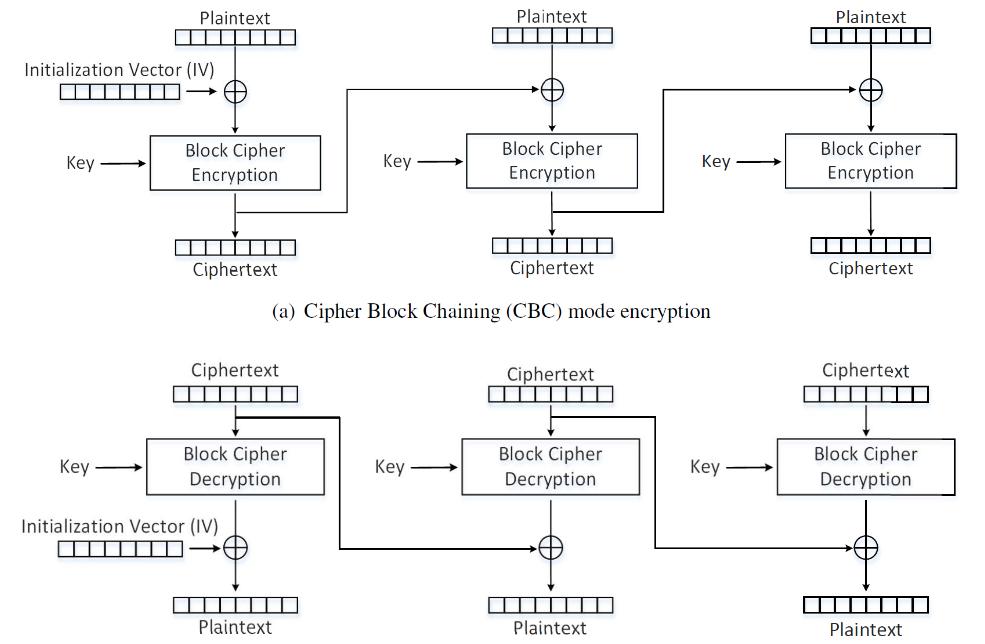
密码分组链接模式 (CBC)
每个明文块与前一个密码块进行异或运算。
#encrypt
$openssl enc  -aes-128-cbc  -e -in plaintext.txt -out cbc_cipher.bin \
-K 00112233445566778889aabbccddeeff \
-iv 0102030405060708
#decrypt
$openssl enc  -aes-128-cbc  -d -in cbc_cipher.bin -out cbc_plain.txt \
-K 00112233445566778889aabbccddeeff \
-iv 0102030405060708
#valid
$diff plaintext.txt cbc_plain.txt
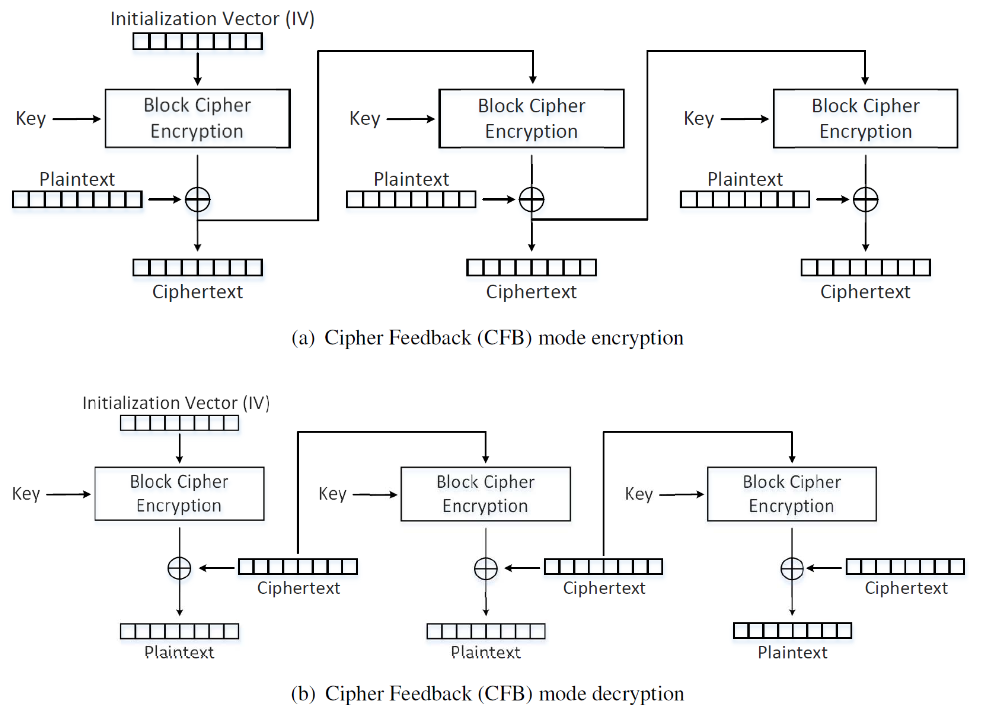
密码反馈模式 (CFB)
前一个块的密文被送入块密码进行加密,加密的输出与明文进行异或运算,生成实际的密文。
#encrypt
$openssl enc  -aes-128-cfb  -e -in plaintext.txt -out cfb_cipher.bin \
-K 00112233445566778889aabbccddeeff \
-iv 0102030405060708
#decrypt
$openssl enc  -aes-128-cfb  -d -in cfb_cipher.bin -out cfb_plain.txt \
-K 00112233445566778889aabbccddeeff \
-iv 0102030405060708
#valid
$diff plaintext.txt cfb_plain.txt
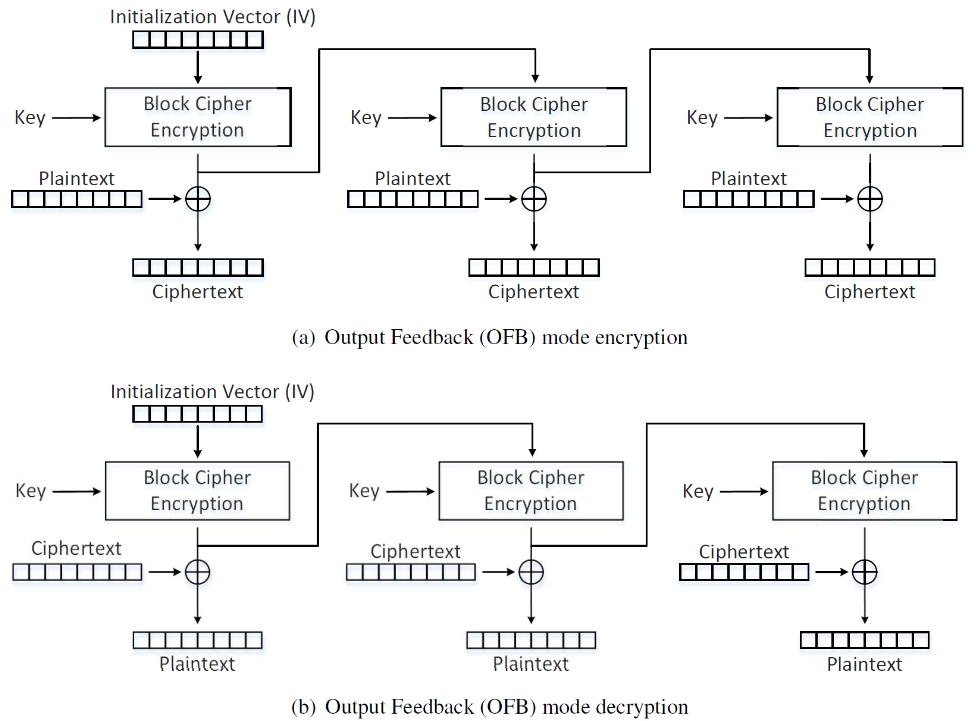
输出反馈模式 (OFB)
类似于CFB,数据在异或运算被反馈输出到下一个块。
#encrypt
$openssl enc  -aes-128-ofb  -e -in plaintext.txt -out ofb_cipher.bin \
-K 00112233445566778889aabbccddeeff \
-iv 0102030405060708
#decrypt
$openssl enc  -aes-128-ofb  -d -in ofb_cipher.bin -out ofb_plain.txt \
-K 00112233445566778889aabbccddeeff \
-iv 0102030405060708
#valid
$diff plaintext.txt ofb_plain.txt
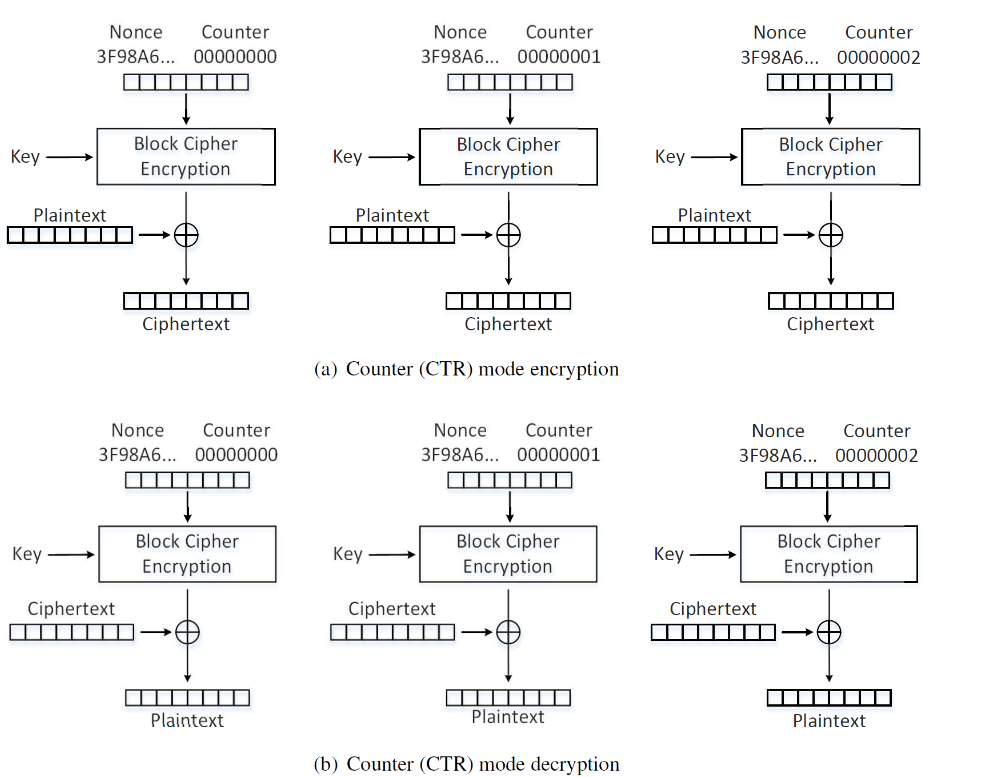
计数器模式 (CTR)
CTR模式中,每个分组对应一个逐次累加的计数器,并通过对计数器进行加密来生成密钥流。也就是说,最终的密文分组是通过将计数器加密得到的比特序列,与明文分组进行XOR而得到的。
#encrypt
$openssl enc  -aes-128-ctr  -e -in plaintext.txt -out ctr_cipher.bin \
-K 00112233445566778889aabbccddeeff \
-iv 0102030405060708
#decrypt
$openssl enc  -aes-128-ctr  -d -in ctr_cipher.bin -out ctr_plain.txt \
-K 00112233445566778889aabbccddeeff \
-iv 0102030405060708
#valid
$diff plaintext.txt ctr_plain.txt
3、加密模式在图片中对比 – ECB vs. CBC
加密如下的pic_original.bmp图片格式文件。
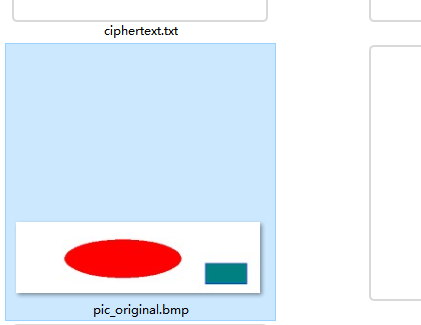
openssl enc  -aes-128-ecb  -e -in pic_original.bmp -out cipher_pic.bmp \
-K 00112233445566778889aabbccddeeff
然后重置加密图片的标题,使其可以被图片查看器打开:
head -c 54 pic_original.bmp > header
tail -c +55 cipher_pic.bmp > body
cat header body > full_cipher_pic.bmp
输出的加密图片显示为:

在某些方面似乎和原图相似。因为我们将文件分成大小为128位的块,并使用AES算法对每个块进行加密。如果两个块在原始图像中是相同的,那么它们在加密图像中将保持相同。
4、填充字段学习
echo -n "123456" > test.txt
ls -ld test.txt
openssl enc  -aes-128-ecb  -e -in test.txt -out output.bin \
-K 00112233445566778889aabbccddeeff
ls -ld output.bin
其中test.txt为6个字节,output.bin为16个字节,ECB加密时填充。
类似地,尝试其他模式,替换-aes-128-ecb并添加参数-iv。
# cbc
openssl enc  -aes-128-cbc  -e -in test.txt -out output.bin \
-K 00112233445566778889aabbccddeeff \
-iv 0102030405060708
ls -ld output.bin # 16
# cfb
openssl enc  -aes-128-cfb  -e -in test.txt -out output.bin \
-K 00112233445566778889aabbccddeeff \
-iv 0102030405060708
ls -ld output.bin #6
# ofb
openssl enc  -aes-128-ofb  -e -in test.txt -out output.bin \
-K 00112233445566778889aabbccddeeff \
-iv 0102030405060708
ls -ld output.bin #6
可见CFB和OFB不需要填充,因为它们取前一块的输出作为其最后一密码块加密的输入,前一块的大小必须等于密码块大小。
echo -n "12345" > f1.txt # 5 bytes
echo -n "123456789A" > f2.txt # 10 bytes
echo -n "0123456789ABCDEF" > f3.txt # 16 bytes
使用CBC模式加密三个文件:
openssl enc  -aes-128-cbc  -e -in f.txt -out output.bin \ # replace f.txt with actual plaintext
-K 00112233445566778889aabbccddeeff \
-iv 0102030405060708
ls -ld output.bin
结果显示,f3.txt的输出为32字节,另外2个为16字节。
原始文件内容f1.txt:
$xxd -g 1 f1.txt
00000000: 31 32 33 34 35                                   12345
使用 -nopad参数加密output.bin:
openssl enc  -aes-128-cbc  -d -in output.bin -out plain_f1.txt \
-K 00112233445566778889aabbccddeeff \
-iv 0102030405060708 -nopad
输出的文件包含16字节,如下:
$xxd -g 1 plain_f1.txt
00000000: 31 32 33 34 35 0b 0b 0b 0b 0b 0b 0b 0b 0b 0b 0b  12345...........
加密的时候填充会被看作密文。
5、python错误传播-损坏的密文
使用python创建一个超过1000字节的大文件:
$python -c "print '1234567890'*100" > big_file.txt
$-ld big_file.txt
#1001
进行加密和解密操作:
openssl enc  -aes-128-ecb  -e -in big_file.txt -out output.bin \
-K 00112233445566778889aabbccddeeff
尝试多种方式:
openssl enc  -aes-128-cbc  -e -in big_file.txt -out output.bin \ #replace cbc as cfb,ofb
-K 00112233445566778889aabbccddeeff \
-iv 0102030405060708
使用“bless”将“output.bin”的第55个(‘0x 37’)字节更换为‘0x 00’
然后解密它:
openssl enc  -aes-128-ecb  -d -in output.bin -out decrypted.txt \
-K 00112233445566778889aabbccddeeff
多种加解密尝试:
openssl enc  -aes-128-cbc  -d -in output.bin -out decrypted.txt \ #replace cbc as cfb,ofb
-K 00112233445566778889aabbccddeeff \
-iv 0102030405060708
学习脚本编写,编写一个diff.py来检查差异:
#!/usr/bin/python3
with open('big_file.txt', 'rb') as f:
    f1 = f.read()
with open('decrypted.txt', 'rb') as f:
    f2 = f.read()
res = 0
for i in range(min(len(f1), len(f2))):
    if f1[i] != f2[i]:
        res += 1
print("diff bytes: "+str(res+abs(len(f1)-len(f2))))
然后使用diff比较原始文件和加密文件:
<!-- openssl enc  -aes-128-ofb  -e -in big_file.txt -out output.bin \
-K 00112233445566778889aabbccddeeff \
-iv 0102030405060708

openssl enc  -aes-128-ofb  -d -in output.bin -out decrypted.txt \
-K 00112233445566778889aabbccddeeff \
-iv 0102030405060708 -->
模式实际差异对比。
| Mode | Different bytes |
|---|---|
| ECB | 16 |
| CBC | 17 |
| CFB | 17 |
| OFB | 1 |
6、初值向量(IV)及常见错误
Task 6.1
如果我们加密的明文是相似的,那么使用相似的IV向量会可能导致同样的密文。
Task 6.2
对于OFB模式,如果KEY和IV保持不变,则已知明文攻击是可行的。
输出流可以通过对明文和密文进行逐块异或得到。
同样,要得到明文,我可以对明文和密文进行异或运算。
OFB模式使用相同的密钥和IV时,不同加密方式的输出流相同,如下:
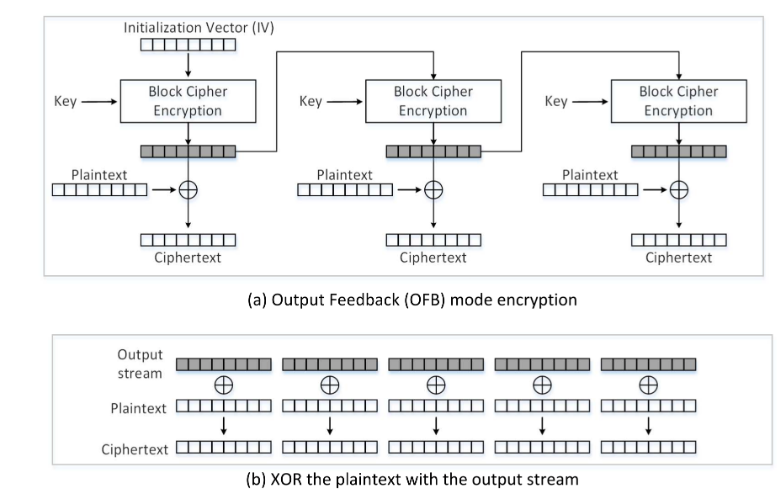
如何理解计算过程:
假设我们知道一个明文p1及其OFB密文c1,以及另一个具有相同密钥和IV的OFB密文c2,但我们不知道c2的明文p2,请对其进行计算:
首先,将第一个明文p1加密后得到输出流:
out_Stream=p1 XOR c1。
然后通过以下方式获取p2:
p2=Output_Stream XOR c2。
将其计算为:
p2=p1 XOR c1 XOR c2。
使用known-plaintext-attack.py:已知明文攻击
#!/usr/bin/python3
from sys import argv

_, first, second, third = argv
p1 = bytearray(first,encoding='utf-8')
c1 = bytearray.fromhex(second)
c2 = bytearray.fromhex(third)
p2 = bytearray(x ^ y ^ z for x, y, z in zip(p1, c1, c2))
print(p2.decode('utf-8'))
实际实战:
Plaintext (P1): This is a known message!
Ciphertext (C1): a469b1c502c1cab966965e50425438e1bb1b5f9037a4c159
Plaintext (P2): (unknown to you)
Ciphertext (C2): bf73bcd3509299d566c35b5d450337e1bb175f903fafc159
known-plaintext-attack.py "This is a known message!" \
a469b1c502c1cab966965e50425438e1bb1b5f9037a4c159 \
bf73bcd3509299d566c35b5d450337e1bb175f903fafc159 \
对于CFB模式,正如其展示的一样,初始块也是如此(即可以通过简单的`XOR‘得到明文)。
但是,如果密钥仍然是保密的,密文的部分将不会被泄露。
Task 6.3
因为p1是Yes,所以当IV是经过使用的IV来生成C1和IV_NEXT会变成可预测的IV来加密下一个明文输入,所以很可能被破解。
实战利用:
Encryption method: 128-bit AES with CBC mode.
Key (in hex): 00112233445566778899aabbccddeeff (known only to Bob)
Ciphertext (C1): bef65565572ccee2a9f9553154ed9498 (known to both)
IV used on P1 (known to both)
(in ascii): 1234567890123456
(in hex) : 31323334353637383930313233343536
Next IV (known to both)
(in ascii): 1234567890123457
(in hex) : 31323334353637383930313233343537
实际操作中,由于payload长度太短,需要根据标准来进行填充,所以需要根据known-plaintext-attack.py做一些可行的修改,创建cipher_con.py:
#!/usr/bin/python3
from sys import argv

_, first, second, third = argv
p1 = bytearray(first, encoding='utf-8')
padding = 16 - len(p1) % 16  # padding to match the block size as 128 bit
p1.extend([padding]*padding)
IV = bytearray.fromhex(second)
IV_NEXT = bytearray.fromhex(third)
p2 = bytearray(x ^ y ^ z for x, y, z in zip(p1, IV, IV_NEXT))
print(p2.decode('utf-8'), end='')
cipher_cons.py "Yes" 31323334353637383930313233343536 31323334353637383930313233343537 > p2
为了获取c2,需要使用query p2:
openssl enc  -aes-128-cbc  -e -in p2 -out c2 \
-K 00112233445566778899aabbccddeeff \
-iv 31323334353637383930313233343537
这种情况下,当明文是16字节的倍数时,应根据标准再填充16个字节以进行加密。
为了对比实际的c1,我们只需要c2的第一个块:
$xxd -p c2
bef65565572ccee2a9f9553154ed94983402de3f0dd16ce789e5475779aca405
其前16个字节与c1相同,因此假设可行性是成立的:
p1 = "Yes"
使用openssl验证:
$echo -n "bef65565572ccee2a9f9553154ed9498" | xxd -r -p > c1
$openssl enc  -aes-128-cbc  -d -in c1 -out p1 \
-K 00112233445566778899aabbccddeeff \
-iv 31323334353637383930313233343536
$cat p2
Yes
7、使用python加密库编程和解密
Plaintext (total 21 characters): This is a top secret.
Ciphertext (in hex format): 764aa26b55a4da654df6b19e4bce00f4
ed05e09346fb0e762583cb7da2ac93a2
IV (in hex format): aabbccddeeff00998877665544332211
为了找到密钥,我们编写一个python脚本实现:
#!/usr/bin/python3
from sys import argv
from Crypto.Cipher import AES
from Crypto.Util.Padding import pad

_, first, second, third = argv

assert len(first) == 21
data = bytearray(first, encoding='utf-8')
ciphertext = bytearray.fromhex(second)
iv = bytearray.fromhex(third)

with open('./words.txt') as f:
    keys = f.readlines()

for k in keys:
    k = k.rstrip('\n')
    if len(k) <= 16:
        key = k + '#'*(16-len(k))
        cipher = AES.new(key=bytearray(key,encoding='utf-8'), mode=AES.MODE_CBC, iv=iv)
        guess = cipher.encrypt(pad(data, 16))
        if guess == ciphertext:
            print("find the key:",key)
            exit(0)

print("cannot find the key!")
使用python脚本得到密钥解开密文。
crack_key.py "This is a top secret." \
764aa26b55a4da654df6b19e4bce00f4ed05e09346fb0e762583cb7da2ac93a2 \
aabbccddeeff00998877665544332211
最后发现密文
find the key: Syracuse########
网站引用:
1.CBC分组密码工作模式
2.英语10000个单词频率排序 作者曲溟


